Programming with Python – Unit Course Notes
Course: 12DGT
Year Level: Year 12 (Level 7 – NCEA Level 2)
Unit / Module: 01_Programming
Aligned Standard(s): AS91896 – Programming with Python
Lesson Context: Core skill development leading to summative assessment
Estimated Time: ~12 weeks (5 weeks prep + 7 weeks assessment)
1. Purpose of These Notes
These notes exist to: - explain programming concepts clearly and precisely - support teacher-led instruction and independent practice - provide a reference students can revisit - reinforce correct terminology and thinking about code
These notes are not a substitute for writing code or debugging practice.
2. Key Concepts (Overview)
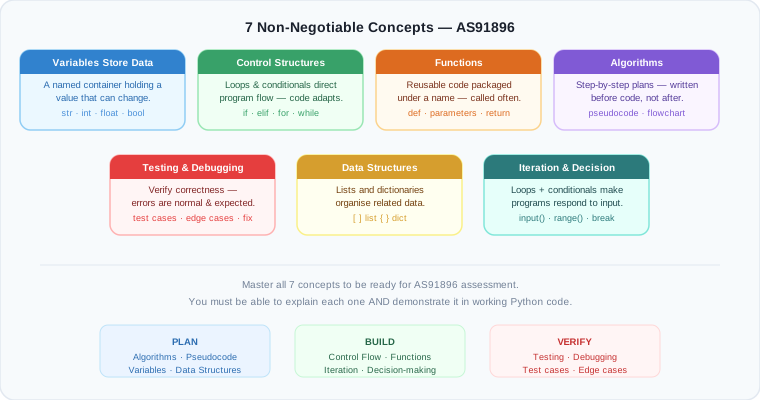
This section lists the non-negotiable ideas students must understand by the end of this unit:
- Variables store data. A variable is a container with a name that holds a value. The value can change.
- Control structures (loops and conditionals) direct program flow. Code does not always run top-to-bottom; decisions and repetition allow programs to adapt.
- Functions break problems into smaller, reusable pieces. A function packages code so it can be called multiple times without repetition.
- Algorithms are step-by-step solutions to problems. Before writing code, you plan the logic.
- Testing and debugging verify correctness. Programs must be tested systematically; errors are normal and expected.
- Data structures organize information. Lists and dictionaries store collections of related data efficiently.
- Iteration (loops) and conditionals enable user input and decision-making. Programs that respond to input are more useful than hard-coded solutions.
If students cannot explain these ideas in their own words AND show them in working code, they have not mastered the topic.
3. Core Explanation
Variables and Data Types
A variable is a named storage location that holds a value. Think of it as a labeled box: the label is the variable name, and the value inside is what we store.
# Example: storing student data
student_name = "Alice"
student_age = 16
test_score = 87.5
passed = True
Why variables matter: Without variables, you would need to repeat values throughout your code. Variables let you:
- Use meaningful names (e.g., student_age instead of just 16)
- Change values without rewriting the entire program
- Work with user input dynamically
What goes wrong: Students sometimes treat variables as "locks" that can't change. Actually, variables can be reassigned:
# This is valid and normal
count = 0
count = count + 1 # count now equals 1
count = 10 # count now equals 10
Control Structures: Conditionals
A conditional (if/elif/else) allows your program to make decisions based on data.
# Example: checking if a student passed
test_score = 75
if test_score >= 70:
print("You passed!")
else:
print("You need to study more.")
Why conditionals matter: Real programs must adapt to different inputs. Without conditionals, your program behaves the same way every time, regardless of circumstances.
What goes wrong: Students often forget the colon (:) after the condition, or use = (assignment) instead of == (comparison):
# WRONG: if test_score = 70: ❌ This assigns instead of comparing
# RIGHT: if test_score == 70: ✓ This compares
Control Structures: Loops
A loop repeats a block of code multiple times. There are two main types:
For loops repeat a known number of times:
While loops repeat until a condition is false:
# Keep asking for input until the user enters 'quit'
response = ""
while response != "quit":
response = input("Enter 'quit' to exit: ")
Why loops matter: Without loops, you would need to write the same code over and over. Loops make programs flexible and concise.
What goes wrong: Students create infinite loops by accidentally making a condition that never becomes false:
Functions
A function is reusable code packaged with a name. Instead of writing the same logic multiple times, you define it once and call it whenever needed.
# Define a function
def greet(name):
print(f"Hello, {name}!")
# Call the function multiple times
greet("Alice")
greet("Bob")
greet("Charlie")
Why functions matter: They reduce repetition, make code easier to test, and organize large programs into understandable pieces.
What goes wrong: Students sometimes forget to call the function, or misunderstand parameters:
# WRONG: This defines the function but never calls it
def add(a, b):
return a + b
# RIGHT: This defines AND calls it
def add(a, b):
return a + b
result = add(3, 5) # result now equals 8
Algorithms and Pseudocode
An algorithm is a step-by-step procedure to solve a problem. Pseudocode is a human-readable way to write an algorithm before coding it in Python.
Example: Algorithm to find the maximum value in a list.
Pseudocode:
1. Set max_value to the first item in the list
2. For each remaining item in the list:
a. If the item is larger than max_value, update max_value
3. Return max_value
Python code:
def find_max(numbers):
max_value = numbers[0]
for num in numbers[1:]:
if num > max_value:
max_value = num
return max_value
Why algorithms matter: They separate thinking from coding. When you plan in pseudocode first, your code is clearer and bugs are fewer.
What goes wrong: Students jump straight to code without planning, leading to muddled logic and repeated rewrites.
Testing and Debugging
Testing means running your code with known inputs and checking the outputs. Debugging means finding and fixing errors.
Good testing practice:
def multiply(a, b):
return a * b
# Test cases
print(multiply(3, 4)) # Expected: 12 ✓
print(multiply(0, 100)) # Expected: 0 ✓
print(multiply(-2, 5)) # Expected: -10 ✓
Debugging approach:
- Use print() statements to see what values your variables hold
- Read error messages carefully; they tell you what went wrong and where
- Trace through your code mentally or on paper before running it
What goes wrong: Students submit code that "works" for one case but fails for others (e.g., works for positive numbers but breaks with negative numbers).
Data Structures: Lists and Dictionaries
A list stores multiple values in order:
A dictionary stores key-value pairs, where you look up values by a meaningful key:
Why data structures matter: They let you organize related information efficiently. Lists are good for sequences; dictionaries are good for labeled data.
What goes wrong: Students confuse list indexing (which starts at 0) with human counting (which starts at 1):
numbers = [10, 20, 30]
# numbers[0] is 10 (first item)
# numbers[1] is 20 (second item)
# numbers[2] is 30 (third item)
# numbers[3] does not exist ❌
4. Diagrams and Visual Models
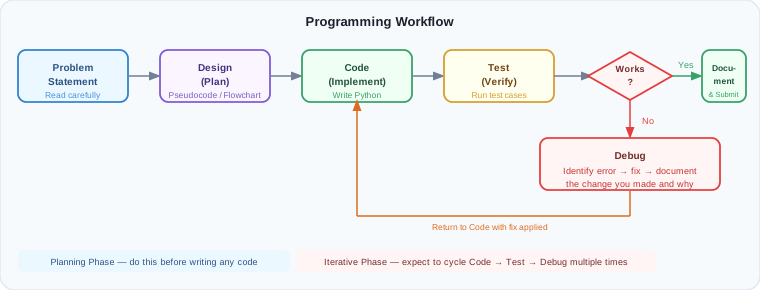
The Programming Workflow
graph TD
A[Problem Statement] --> B[Design: Write Pseudocode]
B --> C[Code: Translate to Python]
C --> D[Test: Run with Known Inputs]
D --> E{Does it work?}
E -->|No| F[Debug: Find the Error]
F --> C
E -->|Yes| G[Optimize & Document]
G --> H[Submit]
How Variables Flow Through a Program
graph LR
A["x = 5<br/>y = 3"] --> B["z = x + y"]
B --> C["print(z)"]
C --> D["Output: 8"]
Conditional Logic Decision Tree
graph TD
A[Check Score] --> B{Is score >= 70?}
B -->|Yes| C[Print 'Passed']
B -->|No| D[Print 'Failed']
C --> E[Continue Program]
D --> E
Loop Iteration
graph TD
A[i = 1] --> B{i <= 5?}
B -->|Yes| C["Print i"]
C --> D["i = i + 1"]
D --> B
B -->|No| E[End Loop]
5. Worked Examples (Conceptual, Not Procedural)
Example 1: Calculating Student Grade
Problem: Write a program that asks for a test score and tells the student their grade (A, B, C, D, or F).
Pseudocode (the thinking):
1. Ask the user for their test score
2. If score >= 90, grade is A
3. Else if score >= 80, grade is B
4. Else if score >= 70, grade is C
5. Else if score >= 60, grade is D
6. Else, grade is F
7. Tell the user their grade
Python code:
score = int(input("Enter your test score: "))
if score >= 90:
grade = "A"
elif score >= 80:
grade = "B"
elif score >= 70:
grade = "C"
elif score >= 60:
grade = "D"
else:
grade = "F"
print(f"Your grade is: {grade}")
Why this works:
- The pseudocode breaks the problem into clear steps
- Each elif is checked only if the previous condition was false
- The final else catches all remaining cases (scores below 60)
- Using a variable grade instead of repeating the print logic is cleaner
What students often get wrong:
- Using if repeatedly instead of elif, which tests all conditions even after one matches (wastes time)
- Forgetting the colon after each condition
- Using = instead of == when comparing values
Example 2: Finding the Sum of Numbers in a List
Problem: Write a function that takes a list of numbers and returns their sum.
Pseudocode:
1. Create a variable to hold the sum, starting at 0
2. For each number in the list:
a. Add the number to the sum
3. Return the sum
Python code:
def calculate_sum(numbers):
total = 0
for num in numbers:
total = total + num
return total
# Test cases
print(calculate_sum([1, 2, 3, 4, 5])) # Expected: 15 ✓
print(calculate_sum([10, 20, 30])) # Expected: 60 ✓
print(calculate_sum([])) # Expected: 0 ✓ (edge case)
print(calculate_sum([-5, 5])) # Expected: 0 ✓ (negative numbers)
Why this works:
- The variable total starts at 0 (the identity for addition)
- The loop processes each number exactly once
- We test edge cases (empty list, negative numbers) to ensure robustness
- Returning a value instead of printing makes the function reusable
What students often get wrong:
- Starting total at the first number instead of 0, which loses the first value
- Resetting total = 0 inside the loop, which wipes out previous additions
- Not testing edge cases like empty lists
Example 3: Avoiding an Infinite Loop
Problem: Ask the user for a password until they enter the correct one.
Pseudocode:
1. Set the correct password
2. Set attempts to 0
3. While the user has not entered the correct password:
a. Ask the user for their password
b. Increment attempts
c. If they entered correctly, break out of the loop
d. Else, tell them it's wrong
4. Tell them they succeeded
Python code:
correct_password = "secret123"
attempts = 0
while True:
password = input("Enter password: ")
attempts = attempts + 1
if password == correct_password:
print(f"Correct! It took {attempts} attempts.")
break # Exit the loop
else:
print("Wrong password. Try again.")
Why this works:
- The while True loop runs indefinitely
- The break statement provides an exit condition when the password is correct
- The attempts counter tracks how many tries it took
- String comparison == checks if two passwords are identical
What students often get wrong:
- Forgetting the break statement, creating an infinite loop that never exits
- Using assignment = instead of comparison == when checking the password
- Not incrementing attempts, so the count stays at 0
6. Common Misconceptions and Pitfalls
Misconception 1: "Code runs top-to-bottom, always in the same order"
Incorrect thinking: Every line of code runs in sequence, no matter what.
Why it's wrong: Conditionals and loops change the order of execution. Code inside an if block might not run at all. Code inside a loop might run many times.
Correct understanding: Code follows the logic you define. A conditional decides whether to run a block. A loop repeats a block. Functions can be called from anywhere.
Misconception 2: "Once I assign a value to a variable, it never changes"
Incorrect thinking: Variables are "set" like constants.
Why it's wrong: Variables are mutable; their values can be reassigned as many times as needed.
Correct understanding: A variable holds whatever value you last assigned to it. You can reassign it:
Misconception 3: "The = symbol is the same as the == symbol"
Incorrect thinking: They both mean "equals."
Why it's wrong: = is assignment (store a value), while == is comparison (check if two values are equal).
Correct understanding:
Misconception 4: "If my code runs without errors, it's correct"
Incorrect thinking: No error message = the code is right.
Why it's wrong: Code can run successfully but produce wrong answers. Syntax errors are caught; logic errors are not.
Correct understanding: You must test your code with multiple inputs and verify the outputs are correct.
Misconception 5: "Loops make my code slower; I should avoid them"
Incorrect thinking: More code execution time = bad.
Why it's wrong: Loops are essential for handling variable-sized data. Without loops, you'd need separate code for every possible list size.
Correct understanding: Loops are efficient and necessary. Optimize logic, not by avoiding loops.
Misconception 6: "I should write lots of code at once before testing"
Incorrect thinking: Write everything, then test everything.
Why it's wrong: If you write 100 lines of code without testing, you'll have many bugs to find at once. Debugging becomes very difficult.
Correct understanding: Write small chunks, test frequently, and fix bugs as you go. This is called incremental development.
7. Assessment Relevance
This unit directly prepares you for AS91896 – Programming with Python, which requires:
- Source code that uses appropriate variables, control structures, and functions
- Test evidence showing your code works correctly for multiple inputs
- Debugging evidence showing how you found and fixed errors
- Design documentation (pseudocode or flowchart) showing you planned before coding
- Reflection on what you learned and what was difficult
What you'll be asked to do: - Write a program that solves a real-world problem (e.g., process student data, manage a simple game) - Show your thinking with pseudocode or comments - Test your code systematically and document the results - Explain any errors you found and how you fixed them - Write clear comments so your code is readable
Why this matters in industry: - Programmers spend more time debugging than writing new code - Professional code includes comments and documentation - Testing catches errors before they reach users - Planning (pseudocode) saves time and reduces mistakes
8. External Resources (Optional but Recommended)
Video Resources
These videos reinforce key concepts and show real Python coding in action:
- Python Basics for Beginners – Corey Schafer – YouTube Playlist – Excellent breakdown of variables, functions, and control flow
- Control Flow in Python (If, Else, Elif) – Programming with Mosh – YouTube – Clear explanation of conditionals with examples
- Python Loops (For and While) – Corey Schafer – YouTube – Visual walkthrough of how loops work
- Debugging Python Code – Real Python – YouTube – How to use print statements and debuggers effectively
- Functions in Python – Corey Schafer – YouTube – Parameters, return values, and reusable code
Interactive Practice Tools
- Replit – https://replit.com – Write and run Python code directly in your browser; great for experimenting
- Python Tutor – https://pythontutor.com – Visualize how your code executes step-by-step
- LeetCode / HackerRank – Free coding challenges to practice algorithms
Textbooks and Guides
- Automate the Boring Stuff with Python (free online) – https://automatetheboringstuff.com – Beginner-friendly, practical examples
- Real Python Tutorials – https://realpython.com – In-depth articles on Python concepts
9. Key Vocabulary
Students are expected to understand and use this terminology accurately:
- Algorithm: A step-by-step procedure to solve a problem.
- Variable: A named storage location that holds a value; the value can change.
- Assignment: Storing a value in a variable using
=. - Comparison: Checking if two values are equal using
==, or comparing with>,<, etc. - Conditional: An
if,elif, orelsestatement that makes a decision based on a condition. - Loop: A block of code that repeats; either
for(fixed number) orwhile(until a condition is false). - Function: Reusable code packaged with a name; takes parameters and may return a value.
- Parameter: A variable that a function accepts as input.
- Return value: The value a function sends back after it finishes.
- List: An ordered collection of values stored in a single variable.
- Dictionary: A collection of key-value pairs where you look up values by a meaningful key.
- Index: The position of an item in a list (starting at 0).
- Pseudocode: Human-readable text describing an algorithm before coding it.
- Syntax: The rules and format of a programming language (e.g., Python requires colons after conditionals).
- Bug: An error in code that causes it to behave incorrectly.
- Debugging: The process of finding and fixing bugs.
- Testing: Running code with known inputs and verifying the outputs.
- Edge case: An unusual or extreme input (e.g., negative numbers, empty lists) that tests robustness.
- Iteration: Repeating a process; often refers to loops or gradual refinement.
- Documentation: Written explanation of what code does and how to use it; includes comments and README files.
End of Programming with Python – Unit Course Notes